Mobile Bus Simulator APK – Latest Version & Download (2026)
Nov 20, 2025
64.50 MB
1.0.8b
Android 6.0 and up
100M+

Description
Mobile Bus Simulator APK is a driving simulation game where you become a bus driver, transport passengers, follow traffic rules, and travel between city terminals. The game is developed by LOCOS and has crossed 100 million downloads on Google Play.
I like the simple transport concept because beginners can understand it quickly. You select a bus, drive through different roads, carry passengers, and earn money as you travel farther.
What Is Mobile Bus Simulator APK?
Mobile Bus Simulator APK is a single-player bus-driving game built around passenger transportation.
Your job is to drive from one city terminal to another while following traffic rules. The game combines city driving, highways, fuel management, passenger transport, and vehicle customisation.
Mobile Bus Simulator APK Latest Version
The official Google Play release was updated on Nov 20, 2025.
It is available for Android and supports phones and tablets. The current listing also confirms offline gameplay, making it useful for players who do not always have an internet connection.
What’s New in the Latest Update?
The current official changelog is short and focuses on:
- Game optimisation
- Bug fixes
These improvements are designed to provide better stability rather than introducing a major new gameplay system.
Mobile Bus Simulator Gameplay Overview
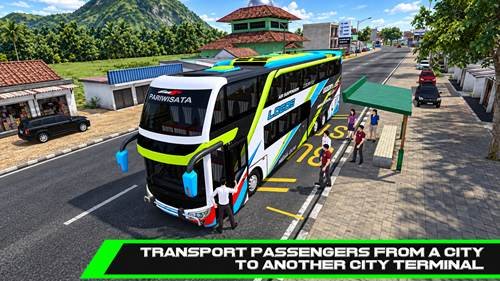
The main gameplay involves transporting passengers between locations.
You drive along roads, manage your bus, follow the route, and try to complete trips safely. Longer journeys and transporting more passengers can help you earn more in-game money.
Main Features of Mobile Bus Simulator APK
Some notable features include:
- Detailed buses
- Realistic maps
- Passenger transportation
- Traffic rules
- Bus customisation
- Fuel management
- Day and night driving
- Horn and teletalk sounds
- Offline gameplay
- Achievements and leaderboards
Drive Different Types of Buses
Players can drive detailed bus models, including super high decker and double-decker buses.
Different vehicles give the game more variety. Rather than concentrating only on speed, I recommend choosing a bus that feels comfortable to control on longer journeys.
Pick Up and Drop Off Passengers
Passenger transportation is central to the experience.
You carry passengers between city terminals and earn money through successful journeys. Following traffic rules and transporting more passengers can also improve your earnings.
Explore Realistic Roads and Cities
The game provides maps with city roads, longer routes, landscapes, and other driving environments.
Traffic adds another challenge because you cannot simply drive at maximum speed. You need to watch the road and control your bus carefully around other vehicles.

Complete Challenging Bus Routes
Longer trips can become more difficult as you deal with traffic, fuel, nighttime driving, and road conditions.
Driving carefully matters. A good approach is to maintain a manageable speed and avoid unnecessary overtaking when the road becomes crowded.
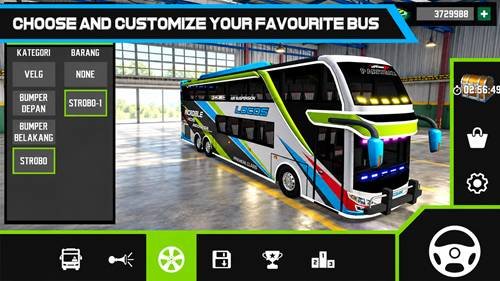
Customise Your Bus
Customisation gives players several ways to change the appearance and personality of their vehicle.
Available options include liveries, horns, telolets, bumpers, wheels, and strobe lights. These features let you personalize the bus while progressing through the game.
Traffic and Driving Conditions
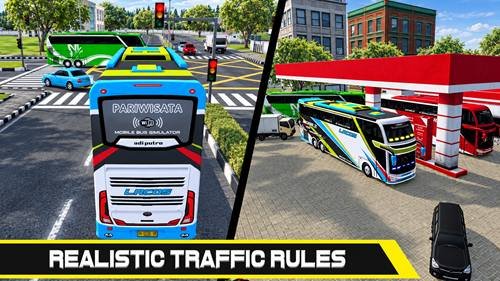
Traffic rules are part of the simulation experience.
You should pay attention to surrounding vehicles and use your lights when driving at night. Fuel also matters because you may need to visit a gas station when your bus starts running low.
Smooth Controls and Camera Views
The game provides different control options that can be selected from the settings menu.
I recommend trying the available driving controls before starting longer routes. Finding a comfortable steering setup can make braking, turning, and navigating traffic much easier.
Graphics, Animations, and Sound Effects
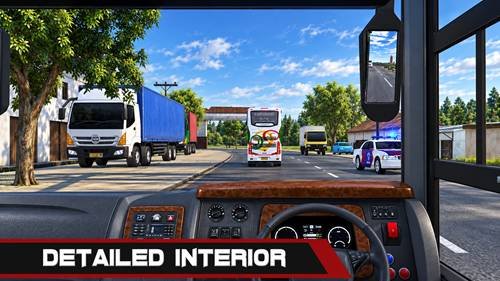
Mobile Bus Simulator uses detailed vehicle models, interiors, maps, and driving environments.
Bus engine sounds, horns, telolets, traffic, and other effects help create a more engaging driving atmosphere without making the controls overly complicated.
Offline Gameplay Experience
Google Play currently lists the game as supporting offline play.
This makes it convenient for travel or situations where mobile data is limited. However, connected services such as online rankings may naturally require an internet connection.
How to Download Mobile Bus Simulator APK
For a safer download:
- Confirm that the developer is LOCOS.
- Check the available version.
- Prefer Google Play when possible.
- Use a reputable source for APK files.
- Scan downloaded files before installation.
Avoid modified files promising unlimited money or other unofficial advantages.
How to Install Mobile Bus Simulator APK on Android
Download the correct file and open it on your phone.
If Android requests permission to install from that source, only allow it when you trust the provider. Follow the installation prompts and launch the game after installation.
How to Play Mobile Bus Simulator APK
Start by selecting a comfortable control method.
Drive your bus along the assigned journey, transport passengers, obey traffic rules, and watch your fuel. As you earn money, you can explore additional vehicles and customisation options.
Tips and Tricks for Beginners
- Practice steering and braking first.
- Follow traffic rules.
- Avoid unnecessary speeding.
- Use headlights at night.
- Watch your fuel level.
- Choose suitable graphics settings.
- Try different control options.
- Drive farther to increase earning opportunities.
System Requirements and Compatibility
Exact requirements can change with future releases, so check the current store listing before downloading.
LOCOS also recommends selecting graphics settings that match your phone’s capabilities. Lower settings may provide smoother performance on less powerful devices.
Is Mobile Bus Simulator APK Safe?
The official Google Play version comes from LOCOS.
Google Play currently says the app may collect personal information, declares no third-party data sharing, and states that collected data is not encrypted and cannot be deleted. Privacy practices may change, so review the current listing before installation.
Third-party packages should always be scanned and verified.
Pros and Cons
Pros
- Passenger transport gameplay
- Multiple detailed buses
- Vehicle customisation
- Realistic maps and traffic rules
- Simple driving controls
- Offline support
Cons
- Contains advertisements
- Includes in-app purchases
- Gameplay may become repetitive
- Online rankings need connectivity
My Personal Experience
From a gameplay perspective, I find the passenger transport system more interesting than simply driving without a purpose. Fuel, traffic rules, customization, and longer routes add extra depth.
Beginners may need a little time to find their preferred steering method, but the overall gameplay concept is easy to understand.
Final Verdict
Mobile Bus Simulator APK offers a straightforward mix of bus driving, passenger transport, realistic maps, vehicle customization, traffic rules, fuel management, and offline play.
It should appeal most to players who enjoy casual bus simulator games and prefer completing transport journeys instead of fast-paced racing.
Frequently Asked Questions
What is Mobile Bus Simulator APK?
It is a bus driving simulation game developed by LOCOS.
Can Mobile Bus Simulator be played offline?
Yes. The official Google Play listing currently identifies it as an offline game.
Can I customize buses?
Yes. Customization includes liveries, horns, bumpers, wheels, teletypes, and other options.
Are different buses available?
Yes. The game includes detailed buses such as super high-decker and double-decker models.
How do I download the Mobile Bus Simulator APK?
Google Play is the safest option. If using an APK source, verify and scan the file first.
Is Mobile Bus Simulator APK safe?
The official LOCOS release is the safer choice. Third-party APK files should be checked carefully before installation.