Piano Kids – Music & Songs – Features, Learning Activities & Download Guide (2026)
2 Hours ago
72.64 MB
3.77
Android 6.0 and up
100M+

Description
Piano Kids – Music & Songs is a colourful educational music app designed for toddlers, preschoolers, and young children. It combines virtual musical instruments, cheerful melodies, and interactive learning games in one place.
I like the idea of combining music with early education because children can explore different sounds while practicing basic skills. In this guide, I’ll explain its features, activities, installation process, safety, and useful tips for parents.
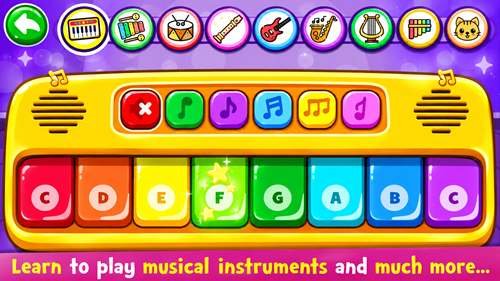
What Is Piano Kids – Music & Songs?
Developed by Orange Studios Games, this Android application introduces children to music through simple touchscreen activities.
Kids can play virtual instruments, listen to melodies, recognise sounds, and explore educational games. Its colourful design makes the activities approachable for young learners.
The app focuses on learning through play rather than complicated musical lessons.
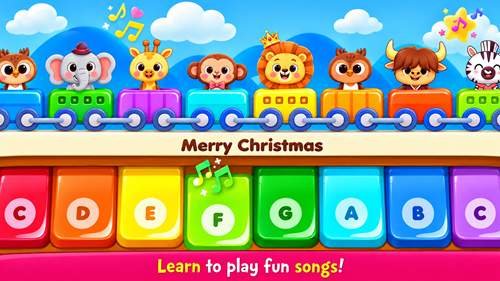
Piano Kids – Music & Songs Features
The app offers several entertaining and educational activities:
- Virtual Instruments: Explore different musical sounds.
- Interactive Piano: Play notes using a touchscreen keyboard.
- Children’s Songs: Listen to and practice familiar melodies.
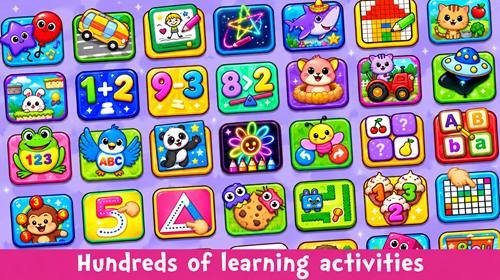
- Educational Games: Enjoy simple learning challenges.
- Animal Sounds: Discover sounds made by different animals.
- Colourful Interface: Navigate through bright, child-friendly screens.
These features make it a useful option for combining entertainment with basic learning.
Musical Instruments and Sound Activities
One of the most interesting parts of the app is its collection of virtual instruments.
Children can explore piano sounds and experiment with instruments such as drums, guitars, and other musical options.
By tapping different notes, kids can discover how sounds change. This encourages curiosity and introduces basic rhythm and musical patterns.
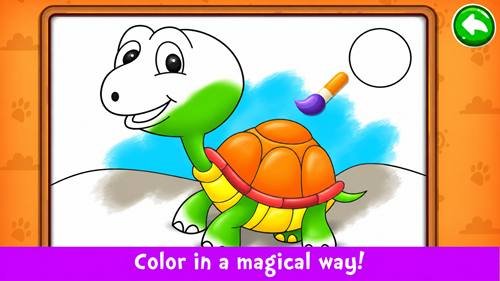
Songs and Music Learning for Kids
Music activities allow children to explore simple tunes and familiar children’s melodies.
Kids can listen to songs, experiment with notes, and try creating their own combinations of sounds.
I recommend letting children explore freely instead of expecting them to play every tune correctly. Music should remain enjoyable, especially for beginners.
Educational Games and Learning Activities
Alongside music, the application includes educational mini-games that introduce basic concepts through interactive play.
These activities may help children practice:
- Shape and pattern recognition
- Memory and matching skills
- Basic number recognition
- Sound identification
- Attention and coordination
The combination of music and learning activities offers variety during short play sessions.
Colours, Numbers, Letters, and Animal Sounds
Young learners can explore familiar educational topics through colourful activities.
Children may practise recognising colours, identifying numbers, exploring letters, and matching animals with their sounds.
These exercises can support early familiarity with everyday concepts. However, they work best alongside conversations, books, and hands-on learning.
Controls and Navigation for Children
The app uses touchscreen controls that are easier for young children to understand than complicated menus.
Large illustrations and interactive elements help children select activities and produce sounds with simple taps.
Parents may still need to help younger children move between different sections.
Android Compatibility and System Requirements
Before installing, review the current device requirements.
Check the following:
- Minimum supported Android version
- Available storage space
- Device performance
- Phone or tablet compatibility
- Internet requirements for specific functions
Exact requirements may change between updates, so checking the latest listing is recommended.
How to Download Piano Kids – Music & Songs
Downloading the app is straightforward:
- Open a trusted application store.
- Search for the app by its full name.
- Confirm that the developer is Orange Studios Games.
- Review the version and device requirements.
- Tap Install to begin downloading.
Avoid unfamiliar modified APK files, especially when installing applications for children.
How to Install Piano Kids on Android
After downloading, the installation normally finishes automatically.
Open the application from your home screen or app drawer. Review the available settings and check the volume before giving the device to a child.
Parents should also inspect advertisements and any purchase options.
How to Use Piano Kids – Music & Songs
Getting started is simple:
- Launch the application.
- Explore the main activity menu.
- Select a musical instrument.
- Tap the screen to play different sounds.
- Try songs or educational mini-games.
- Switch activities according to the child’s interests.
I recommend beginning with the piano keyboard because it introduces the connection between touch and sound.
Tips for Parents and Supervised Play
Parents can make the experience more meaningful by participating in activities.
- Introduce one instrument at a time.
- Encourage children to describe different sounds.
- Practice colours and numbers together.
- Keep the device volume comfortable.
- Set reasonable screen-time limits.
- Combine app activities with real musical instruments or toys.
Children often benefit from guidance rather than spending long periods playing independently.
Common Problems and Troubleshooting
App not opening: Restart the device and check for updates.
Sound not working: Increase media volume and check silent or Bluetooth audio settings.
App freezing: Close unnecessary background applications and reopen the game.
Installation failing: Check storage space and Android compatibility.
Touchscreen not responding: Restart the app and inspect the device screen.
If problems continue, reinstalling the official version may help.
Piano Kids Privacy and Child Safety
Child safety should remain a priority when choosing educational applications.
Review the developer’s privacy policy, requested permissions, advertisements, and in-app purchases.
I recommend using parental controls where available and supervising younger children during play.
Avoid sharing unnecessary personal information through any application.
Pros and Cons of Piano Kids – Music & Songs
Pros
- Colourful, child-friendly design
- Interactive musical instruments
- Fun educational mini-games
- Simple touchscreen controls
- Encourages creative sound exploration
- Suitable for short learning sessions
Cons
- Advertisements may interrupt activities
- Some content may require additional access
- Younger children need supervision
- Cannot replace hands-on musical education
Final Thoughts
Piano Kids – Music & Songs brings together virtual instruments, children’s melodies, and early learning activities in an accessible Android app.
Its simple controls and colourful presentation make it an interesting option for young children exploring music.
I recommend combining digital activities with parental involvement, creative play, and real-world learning for a more balanced experience.
Frequently Asked Questions
What is Piano Kids – Music & Songs?
It is an educational Android application that combines virtual instruments, songs, and learning games for children.
Is Piano Kids – Music & Songs free to download?
The app is generally offered as a free download, although advertisements or optional purchases may be present.
What musical instruments are available?
Children can explore virtual piano sounds and other instruments, including drums and guitars.
Can children learn songs using Piano Kids – Music & Songs?
Yes. The app includes music activities that introduce simple melodies and musical notes.
Does it include educational games?
Yes. It combines musical entertainment with activities involving sounds, numbers, colours, and other basic concepts.
Can Piano Kids – Music & Songs work without an internet connection?
Some installed activities may work offline, but specific features and advertisements may require internet access.
How do I download Piano Kids – Music & Songs on Android?
Find the official app listing, verify the developer, and follow the installation instructions.
Is Piano Kids safe for children?
It can be used as a supervised learning activity. Parents should review privacy settings, advertisements, and purchase options before allowing children to play.