Dead Target: Zombie Games 3D – Features, Gameplay & Download Guide
2 Hours ago
149 MB
4.183.0
Android 6.0 and up
100M+

Description
Dead Target: Zombie Games 3D is an exciting first-person shooting game for Android that takes players into a dangerous world filled with zombies. The game combines intense shooting missions, powerful weapons, and challenging survival battles.
Developed by VNGGames Studios, this zombie shooter offers action-packed gameplay with detailed 3D environments. In this guide, I’ll explain its features, weapons, missions, download process, and useful survival tips.
What Is Dead Target: Zombie Games 3D?
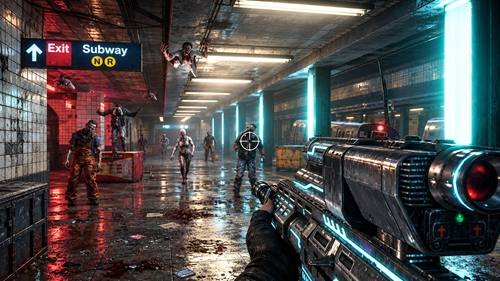
Dead Target is a mobile zombie shooting game set in a post-apocalyptic world where a deadly outbreak has turned people into dangerous creatures.
Players take the role of a survivor who must eliminate zombies and complete different combat missions. The main objective is to survive enemy attacks while improving weapons and shooting skills.
Unlike open-world survival games, its gameplay mainly focuses on aiming, shooting, and completing missions from fixed combat positions.
Dead Target: Zombie Games 3D Features
The game offers several features for action and shooting fans:
- Zombie Shooting Missions: Fight enemies across challenging stages.
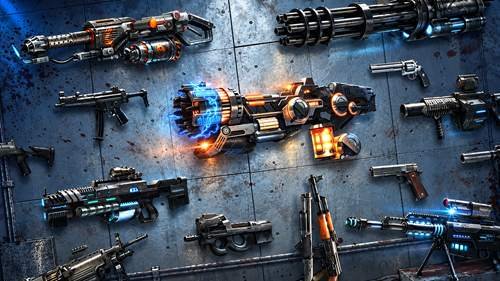
- Powerful Weapons: Unlock guns and improve their performance.
- 3D Graphics: Explore detailed environments and zombie characters.
- Different Enemies: Face zombies with varying abilities.
- Weapon Upgrades: Increase damage and combat effectiveness.
- Mission Rewards: Earn resources through gameplay.
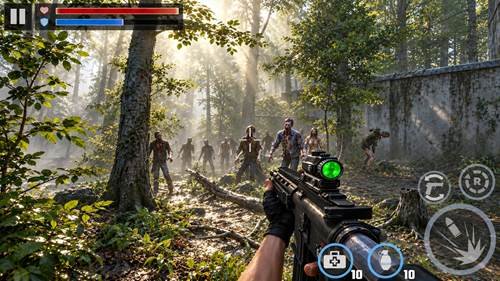
- Simple Controls: Aim, shoot, and reload using touchscreen buttons.
These features create an engaging shooting experience for players who enjoy zombie action games.
Zombie Shooting Gameplay and Missions
The gameplay focuses on completing shooting objectives while surviving zombie attacks.
Each mission places players against enemies that approach from different directions. As the game progresses, zombie waves become more challenging.
I recommend paying attention to enemy movement instead of shooting randomly. Accurate shots can help conserve ammunition and improve mission performance.
Completing missions allows players to progress through additional stages.
Weapons, Gun Upgrades, and Equipment
Weapons play an important role in surviving difficult battles.
The game includes different firearm categories, such as assault rifles, shotguns, and other powerful guns.
Players can improve weapon performance through available upgrades.
Important weapon characteristics include:
- Damage: Determines how much harm each shot causes.
- Fire Rate: Controls how quickly a weapon shoots.
- Accuracy: Helps players hit targets more consistently.
- Reloading: Affects how quickly ammunition becomes available.
- Ammunition Capacity: Determines the number of shots before reloading.
I suggest upgrading frequently used weapons before spending resources on unnecessary equipment.
Zombie Types and Combat Challenges
Not every zombie behaves the same way.
Some enemies move slowly, while others approach quickly or require more shots to defeat. Stronger enemies and boss encounters can make later missions difficult.
Understanding enemy movement is important for survival.
Focus on dangerous targets first and avoid wasting ammunition on enemies that are not immediate threats.
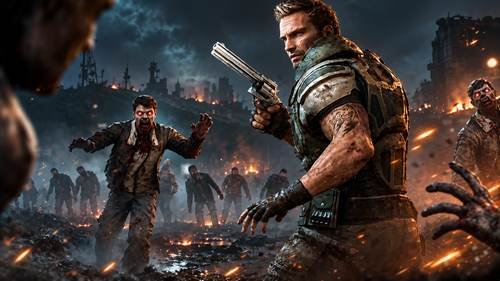
Graphics, Sound Effects, and Controls
The game uses 3D environments, zombie animations, and combat effects to create an action-focused atmosphere.
Gunfire sounds and enemy effects add intensity during shooting missions.
The touchscreen interface provides aiming, shooting, and reloading controls.
Players can review available settings to improve comfort and performance on their devices.
Rewards and Game Progression
Completing missions helps players earn in-game rewards that can support further progress.
Depending on the available game systems, resources may be used to unlock weapons or improve existing equipment.
As missions become harder, weapon upgrades and accurate shooting become increasingly important.
I recommend managing resources carefully instead of upgrading every weapon immediately.
Android Compatibility and System Requirements
Device compatibility depends on the current game version.
Before downloading, check:
- Supported Android version
- Available storage space
- Device RAM and processing performance
- Internet requirements
- Available game updates
Older smartphones may experience slower performance during demanding shooting scenes.
How to Download Dead Target: Zombie Games 3D
Follow these simple steps:
- Open a trusted application store.
- Search for the game’s official title.
- Verify the developer information.
- Review the current version and compatibility.
- Select Install to begin downloading.
- Wait until the process finishes.
Avoid modified APK files from unfamiliar websites because they may create security risks.
How to Install Dead Target: Zombie Games 3D on Android
After downloading, the game normally installs automatically.
Open it from your home screen or application drawer. Review the initial settings and allow any required game resources to load.
Once the main menu appears, you can begin exploring the available missions.
How to Play Dead Target: Zombie Games 3D
New players can get started with these steps:
- Launch the game.
- Select an available mission.
- Learn the aiming and shooting controls.
- Target approaching zombies.
- Reload when necessary.
- Complete the mission objectives.
- Collect rewards and improve weapons.
The basic controls are easy to understand, but later missions require better accuracy and faster reactions.
Tips for Surviving Zombie Attacks
Here are some useful strategies for beginners:
- Aim for the Head: Headshots can help eliminate enemies efficiently.
- Reload Carefully: Avoid reloading when zombies are dangerously close.
- Upgrade Weapons: Improve damage and performance as missions become harder.
- Watch Fast Enemies: Prioritise zombies that approach quickly.
- Save Resources: Spend rewards on upgrades that provide meaningful benefits.
- Practice Accuracy: Controlled shooting is often better than wasting ammunition.
I recommend learning enemy patterns before attempting more difficult missions.
Common Problems and Troubleshooting
Game Not Installing: Check storage space and Android compatibility.
Game Crashing: Restart your device and close unnecessary background applications.
Slow Gameplay: Reduce available graphics settings and free device memory.
Loading Problems: Check your internet connection if the game needs additional resources.
Update Issues: Confirm that enough storage is available and install the latest compatible release.
If problems continue, reinstalling the official game may help.
Dead Target: Zombie Games 3D Privacy and Safety
Downloading from trusted sources is important for protecting your device.
Review requested permissions, the developer’s privacy policy, and available account settings.
The game may include advertisements and optional in-app purchases. Parents should review its content and purchase settings before allowing younger players to use it.
Keep the application updated to receive available fixes and improvements.
Pros and Cons of Dead Target: Zombie Games 3D
Pros
- Exciting first-person zombie shooting
- Different weapons and upgrades
- Challenging combat missions
- Detailed 3D environments
- Simple touchscreen controls
- Reward-based progression
Cons
- Some missions may feel repetitive
- Stronger enemies can become difficult
- Optional purchases may affect progression
- Advertisements may interrupt gameplay
- Older devices may experience performance issues
Final Thoughts
Dead Target: Zombie Games 3D offers an entertaining shooting experience for players who enjoy zombie battles, weapon upgrades, and survival challenges.
Its straightforward controls make it approachable for beginners, while increasingly difficult missions provide challenges for experienced players.
I recommend it to fans of mobile FPS games who prefer action-focused missions over complicated open-world exploration.
Frequently Asked Questions
What is Dead Target: Zombie Games 3D?
It is a first-person zombie shooting game where players complete missions, fight enemies, and upgrade weapons.
Is Dead Target: Zombie Games 3D free to play?
The game is available as a free download, although it may include advertisements and optional in-app purchases.
Can I play Dead Target: Zombie Games 3D offline?
Some gameplay may be available offline, but certain features or updates may require an internet connection.
How do I download Dead Target on Android?
Find the official game listing, verify the developer, and follow the installation instructions.
How can I upgrade weapons?
Open the available weapon or upgrade menu and use earned game resources to improve supported weapon attributes.
What are the minimum system requirements?
Requirements depend on the current version. Check the official listing for supported Android versions and device compatibility.
Why is Dead Target: Zombie Games 3D not working on my phone?
Possible causes include insufficient storage, outdated software, compatibility problems, or corrupted game files.
Is Dead Target safe to download?
Downloading the authentic game from a trusted source is safer than using unknown or modified installation files.