KMPlayer APK Free Download: Latest Version – Complete Guide
Today
8.2 MB
v1.2.34
Android 5+
10M

Description
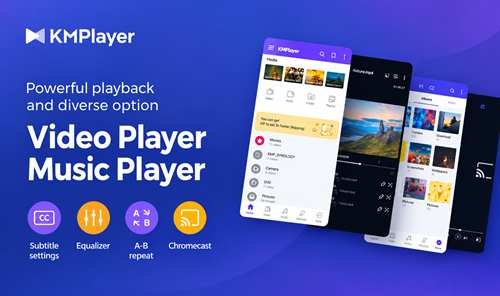
KMPlayer APK is a popular choice for Android users looking for a flexible video and audio player. KMPlayer can play local videos, music, and subtitle files while offering useful playback controls and customisation options.
In this guide, we will cover its main features, supported formats, subtitles, download and installation steps, requirements, settings, safety, and free versus premium options.
What Is KMPlayer?
KMPlayer is a multimedia player developed by PANDORA.TV. The Android app supports high-resolution video, music, and subtitle playback with features designed for both casual and regular media users.
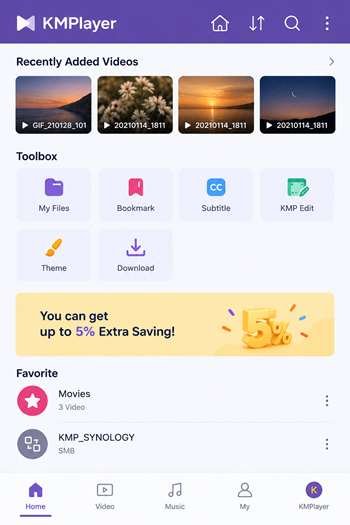
It can scan media stored on your device and provides controls for brightness, colour, playback speed, screen size, subtitles, and more. The app also supports network and cloud playback features.
KMPlayer APK Free Download Latest Version
For the safest KMPlayer APK download, I recommend using the official Google Play listing whenever possible. The current listing shows 10M+ downloads and was updated on September 1, 2026.
If you choose a third-party APK file, check the source, version, developer information, and file security before installing it. Your device should also have enough free storage for the application and media files you want to play.
Key Features of KMPlayer APK
KMPlayer APK offers a strong collection of video and audio playback features:
- High-quality video playback
- Support for many video and music formats
- Subtitle customisation
- Playback speed controls
- Brightness and colour adjustment
- Screen zoom and expansion
- Section repeat
- Bookmarks
- Equaliser
- Chromecast support
- Network playback
- Cloud playback
- Playlist support
The official site also lists Wi-Fi file transfer, quick buttons, subtitle controls, timers, and zoom or move functions.
KMPlayer Video and Audio Playback
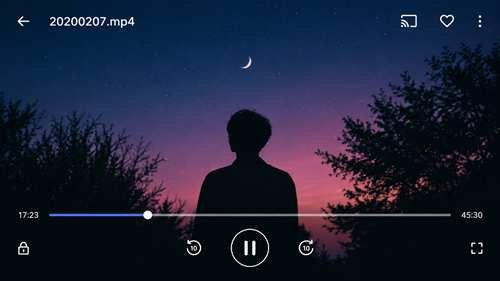
Using KMPlayer APK is straightforward. Open the app, select a video or audio file, and start playback.
During video playback, you can adjust brightness, volume, screen size, and other controls. You can also change playback speed when you want to watch content more slowly or quickly.
For music, the equaliser and playlist features make it useful as a local audio player as well.
Supported Video and Audio Formats
KMPlayer APK supports a wide range of media files. The official Google Play listing includes formats such as:
- MP4
- MKV
- AVI
- MOV
- WMV
- FLV
- MPEG/MPG
- 3GP
- M4V
- MP3
- WAV
- AAC
- FLAC
- RMVB
The exact playback experience can depend on the device, codec, and media file.
KMPlayer Subtitle Support
Subtitle support is one of the app’s useful features. You can adjust subtitle colour, size, and position while watching compatible videos.
It supports formats including SRT, ASS/SSA, SMI, VTT, VobSub, and several other subtitle formats. If subtitles are out of sync, checking the subtitle file and synchronisation settings can often solve the problem.
How to Download KMPlayer APK on Android
For a safe download:
- Open the Google Play Store.
- Search for KMPlayer – All Video Player.
- Confirm that PANDORATV is the developer.
- Check the current version and update date.
- Verify your device compatibility.
- Tap Install.
- Wait for the app to finish installing.
If you download an APK from another source, scan and verify the file before opening it.
How to Install KMPlayer APK
If you already have a legitimate APK file:
- Open your file manager.
- Find the downloaded APK.
- Tap the file.
- Allow installation from that source only if Android asks.
- Tap Install.
- Wait for installation to finish.
- Open KMPlayer and review the requested permissions.
The official listing says storage/file access may be required so the app can access photos, music, and videos on the device. The pop-up play permission is optional for its related feature.
How to Use KMPlayer on Android
After opening the app, select a local video or music file. Once playback starts, use the on-screen controls to adjust volume, brightness, screen size, or speed.
You can also add subtitles, create bookmarks, repeat a section, adjust the equalizer, or use other available playback settings.
KMPlayer Android Requirements
The current official Google Play listing does not provide a universal minimum RAM or storage figure. Requirements can also vary according to the Android version, device hardware, and media quality.
For smooth HD or higher-resolution playback, I recommend using a reasonably modern Android phone with sufficient free storage and good hardware performance.
KMPlayer Settings and Playback Options
KMPlayer provides many customization choices. Depending on the version, you can adjust:
- Video brightness and color
- Audio equalizer
- Playback speed
- Aspect and screen size
- Subtitle color and position
- Section repeat
- Screen zoom
- Background or pop-up playback
- Playback timer
These options make the player flexible for different viewing preferences.
Is KMPlayer APK Safe to Use?
The official Google Play version is the safest choice. Avoid suspicious websites offering modified APKs or premium features for free.
Before installing a third-party file, check its source, scan it with security software, review permissions, and avoid files that request unnecessary access.
The official Play Store listing currently reports no data shared with third parties and no data collected, although users should remember that privacy practices can change over time.
KMPlayer Free vs Premium Features
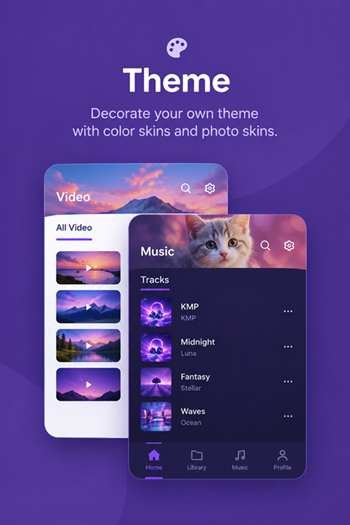
The free version provides core video, audio, subtitle, and playback features. Premium/VIP options add functions such as video and audio cutting, GIF creation, MP3 conversion, VIP themes, and other advanced tools.
For normal media playback, the free version may be enough. Users who need advanced editing or conversion tools can consider the official premium options.
Pros and Cons of KMPlayer
Pros
- Wide media format support
- Strong subtitle options
- Useful playback controls
- Audio equaliser
- Customisable settings
- Network and cloud playback
- Easy-to-use interface
Cons
- Some advanced features require premium access
- High-resolution videos may require stronger hardware
- Features can change with updates
- Unofficial APK files may create security risks
KMPlayer Alternatives for Android
If KMPlayer does not meet your needs, you can also consider other trusted Android media players such as VLC for Android and MX Player. Compare their format support, subtitle tools, network playback, advertisements, and premium features before choosing one.
Final Verdict
KMPlayer APK Free Download Latest Version is a useful option for Android users who want one app for video, music, subtitles, and flexible playback controls.
Its broad format support, subtitle customisation, equaliser, speed controls, and network features make it more than a basic video player. For safety, I recommend downloading the official version and keeping it updated.
Frequently Asked Questions
What is KMPlayer APK?
It is the Android package of KMPlayer, a media player for videos, music, and subtitles.
Is KMPlayer free to download?
Yes. The official Android app is free to install, with optional premium features and in-app purchases.
Which video formats does KMPlayer support?
It supports formats including MP4, MKV, AVI, MOV, WMV, FLV, MPEG, 3GP, and M4V.
Does KMPlayer support subtitles?
Yes. It supports multiple subtitle formats and allows users to adjust subtitle color, size, and position.
Can KMPlayer play audio files?
Yes. It supports several music formats, including MP3, WAV, AAC, and FLAC.
What are the Android requirements for KMPlayer?
The official listing does not provide a fixed RAM or storage requirement. Compatibility depends on the device and Android version.
What is the difference between KMPlayer Free and Premium?
Premium adds advanced tools such as media cutting, GIF creation, MP3 conversion, and VIP themes.
Is KMPlayer APK safe to use?
The official Google Play version is the recommended choice. Be cautious with modified APK files from unknown websites.
What are the best KMPlayer alternatives for Android?
VLC for Android and MX Player are two popular alternatives worth considering.