Two Dots: Brain Puzzle Games – Features, Gameplay & Download Guide (2026)
2 Hours ago
162 MB
26.40.00
Android 9 and up
50M+

Description
Two Dots: Brain Puzzle Games is a colourful and relaxing puzzle game for Android that challenges players to connect matching dots and solve creative puzzles. It combines simple controls with clever challenges, making it enjoyable for beginners and experienced puzzle lovers.
Developed by PlayDots, this popular mobile game offers beautiful environments, hundreds of challenging puzzles, and helpful power-ups. In this guide, I’ll explain its gameplay, main features, download process, and useful strategies for completing difficult levels.
What Is Two Dots: Brain Puzzle Games?
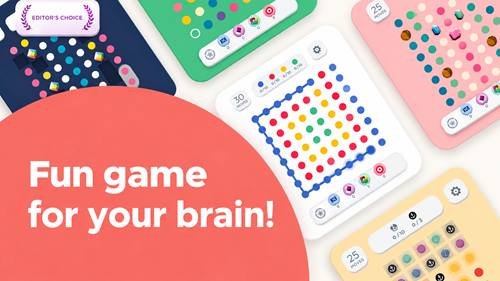
Two Dots is a casual brain puzzle game where players connect dots of the same color to complete different objectives.
The main challenge is to clear matching dots within a limited number of moves. As players progress, new obstacles and puzzle mechanics make the experience more interesting.
I recommend this game to people who enjoy relaxing entertainment that also requires logical thinking and careful planning.
Key Features of Two Dots: Brain Puzzle Games
The game offers several enjoyable features:
- Colour Matching: Connect dots of the same color to solve puzzles.
- Challenging Levels: Explore thousands of puzzles with increasing difficulty.
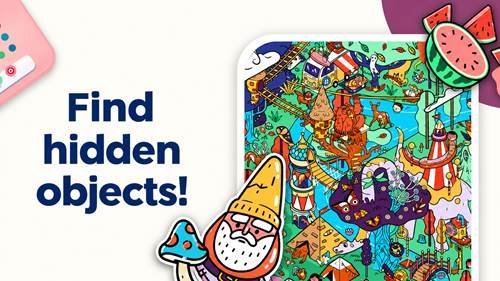
- Beautiful Maps: Discover colourful environments and themed locations.
- Helpful Boosters: Use special items to overcome difficult challenges.
- Special Events: Participate in additional puzzle activities.
- Simple Controls: Connect dots with easy touchscreen gestures.
- Relaxing Music: Enjoy gentle background sounds during gameplay.
These features make the game suitable for both short breaks and longer puzzle sessions.
Dot-Matching Gameplay and Puzzle Objectives
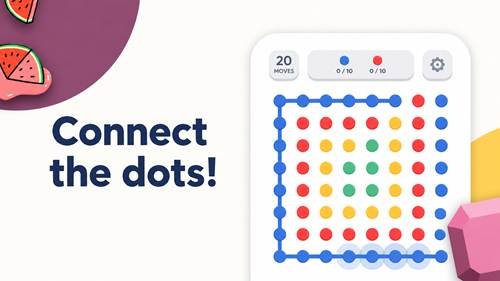
The gameplay starts with a simple idea: connect two or more matching dots horizontally or vertically.
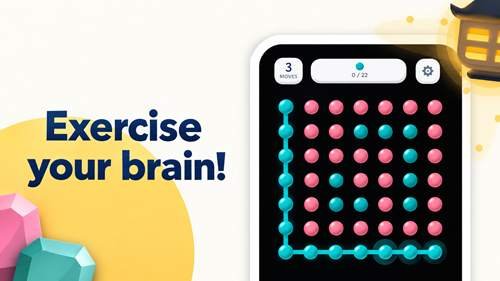
Players can also create squares by connecting four or more dots of the same colour in a closed loop. This removes all dots of that colour from the board.
Each level has specific objectives, such as clearing certain colours or removing obstacles.
I suggest checking the mission goals before making your first move. Random matching may waste valuable moves.
Levels, Maps, and Puzzle Challenges
Two Dots includes a large collection of levels spread across beautifully designed maps.
Early puzzles introduce basic matching mechanics, while later stages require more planning and patience.
Players may encounter obstacles that change how dots move or limit available combinations.
Completing levels unlocks new challenges and allows players to continue exploring the puzzle adventure.
Boosters, Power-Ups, and Special Items
Boosters help players complete difficult puzzles when ordinary matching is not enough.
Depending on the level and available items, these tools may help remove dots, clear obstacles, or improve the board.
I recommend saving boosters for challenging situations rather than using them immediately.
Careful resource management can make later levels easier without relying heavily on optional purchases.
Special Events and Additional Game Modes
The game offers special activities alongside its main puzzle adventure.
Limited-time events may introduce unique challenges, additional objectives, and opportunities to earn rewards.
These activities help keep the gameplay interesting beyond regular levels.
Players should check the event section for available challenges, as activities and rewards may change through updates.
Graphics, Music, and Touch Controls
One of the game’s strongest features is its attractive visual design.
Colourful dots, minimalist artwork, and creative backgrounds give each puzzle a clean appearance.
The relaxing music creates a pleasant atmosphere without distracting from the challenges.
Touchscreen controls are straightforward. Players simply drag their fingers across matching dots to create connections.
Android Compatibility and System Requirements
Device requirements depend on the current version of the game.
Before installing, review:
- Supported Android version
- Available storage space
- Device RAM and processing performance
- Internet connection requirements
- Compatibility with your smartphone
Some features, including updates and online events, may require internet access.
How to Download Two Dots: Brain Puzzle Games on Android
Follow these simple steps to download the official game:
- Open Google Play on your Android device.
- Search for Two Dots: Brain Puzzle Games.
- Find the official game listing.
- Check the developer and device compatibility.
- Tap Install.
- Wait for the download to finish.
Avoid unknown APK websites that may distribute modified or unsafe installation files.
How to Install Two Dots: Brain Puzzle Games
The installation process is straightforward.
After downloading, the game installs automatically through the official application store.
Open the game from your home screen and review the available settings.
You can then start your first puzzle and learn the basic matching controls.
How to Play Two Dots: Brain Puzzle Games
Beginners can follow these steps:
- Open the game and select an available level.
- Review the puzzle objectives.
- Connect two or more dots of the same colour.
- Create squares whenever possible.
- Remove obstacles and complete the required goals.
- Finish the puzzle before running out of moves.
- Unlock the next level.
The controls are easy to learn, but advanced puzzles require better planning.
Tips for Completing Difficult Levels
Here are some useful strategies for improving your gameplay:
- Create Squares: Clearing an entire colour can open more matching opportunities.
- Study the Board: Look for useful combinations before making moves.
- Focus on Objectives: Prioritise the actual level goals.
- Save Boosters: Use special items when they provide a meaningful advantage.
- Watch Your Moves: Avoid unnecessary connections.
- Stay Patient: Difficult puzzles may require several attempts.
I recommend planning two or three moves ahead whenever possible.
Common Problems and Troubleshooting
Game Not Installing: Check your available storage and Android compatibility.
Game Crashing: Restart your phone and close unnecessary background applications.
Slow Performance: Free device memory and update the application.
Loading Problems: Check your internet connection if the game needs online resources.
Missing Progress: Review available account synchronisation or recovery options before reinstalling.
If problems continue, contact the game’s official support team.
Two Dots: Brain Puzzle Games, Privacy and Safety
Downloading the authentic game from a trusted source helps reduce security risks.
Review its privacy policy and requested permissions before playing.
The game may include advertisements and optional in-app purchases, so parents should review purchase settings when children use the device.
Keeping the application updated can also help improve stability and security.
Pros and Cons of Two Dots: Brain Puzzle Games
Pros
- Simple and relaxing puzzle gameplay
- Attractive graphics and colourful maps
- Thousands of challenging levels
- Easy touchscreen controls
- Helpful boosters and special events
- Encourages logical thinking and planning
Cons
- Some puzzles become difficult
- Limited moves may feel frustrating
- Optional purchases are available
- Certain features require internet access
- Players may need repeated attempts to finish challenging levels
Final Thoughts
Two Dots: Brain Puzzle Games offers a relaxing combination of colourful visuals, creative puzzles, and strategic matching gameplay.
Its simple controls make it accessible to beginners, while challenging levels provide plenty of opportunities to improve puzzle-solving skills.
I recommend it to players who enjoy casual brain games, logical challenges, and beautiful puzzle adventures. For the safest experience, download the official version and keep it updated.
Frequently Asked Questions
What is Two Dots: Brain Puzzle Games?
It is a mobile puzzle game where players connect matching coloured dots and complete different challenges.
Is Two Dots: Brain Puzzle Games free to play?
Yes, it is free to download, with optional in-app purchases.
Can I play Two Dots: Brain Puzzle Games offline?
Some regular puzzles may work offline, but certain events and online features require internet access.
How do I download Two Dots on Android?
Search for the official game in Google Play and select Install.
How do I create squares in Two Dots: Brain Puzzle Games?
Connect matching dots horizontally and vertically to form a closed square or loop.
How can I complete difficult levels?
Focus on objectives, create squares, plan moves carefully, and use boosters when necessary.
Does Two Dots: Brain Puzzle Games support older Android devices?
Compatibility depends on the current version and your device’s specifications.
Is Two Dots: Brain Puzzle Games safe to download?
The official game is generally safer to install from a trusted app store than from unknown third-party sources.